Research mode
I added a new feature that’s been in the back of my mind for a while. It’s a way to read and review information and use it to create spans.
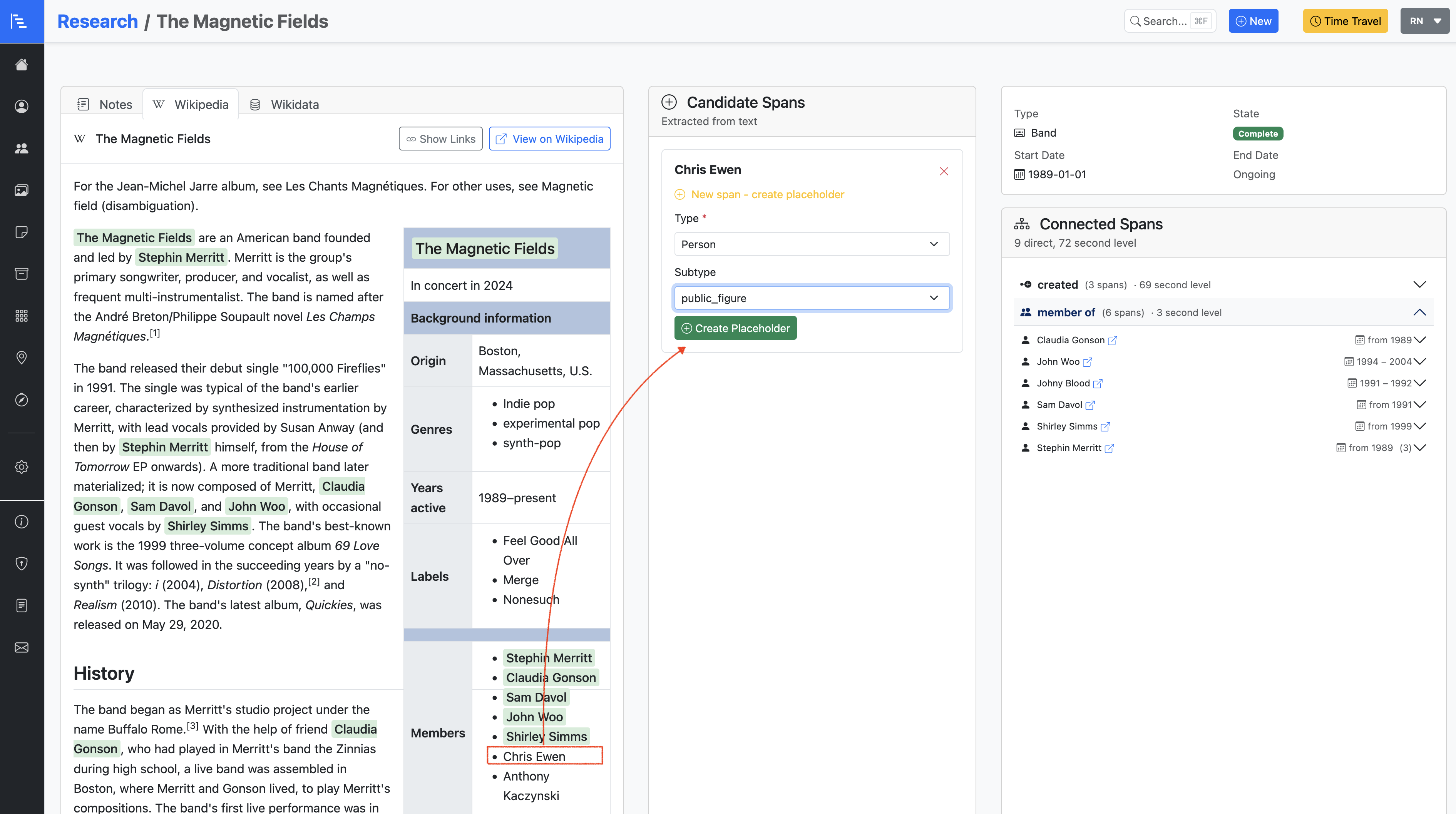
If you’re looking at a public spans - things that appear in Wikipedia - you can read the corresponding article, which looks something like this…
Kurt Vonnegut (/ˈvɒnəɡət/ VON-ə-gət; November 11, 1922 – April 11, 2007) was an American author known for his satirical and darkly humorous novels. His published work includes fourteen novels, three short-story collections, five plays, and five nonfiction works over fifty years; further works have been published since his death.
Born and raised in Indianapolis, Vonnegut attended Cornell University, but withdrew in January 1943 and enlisted in the U.S. Army. As part of his training, he studied mechanical engineering at the Carnegie Institute of Technology and the University of Tennessee. He was then deployed to Europe to fight in World War II and was captured by the Germans during the Battle of the Bulge. He was interned in Dresden, where he survived the Allied bombing of the city in a meat locker of the slaughterhouse where he was imprisoned. After the war, he married Jane Marie Cox. He and his wife both attended the University of Chicago while he worked as a night reporter for the City News Bureau.
Wikidata on the other hand, presents the same kind of information as structured data…
- Entity ID: Q49074
- Label: Kurt Vonnegut
- Description: American author (1922–2007)
| Property | Value |
|---|---|
| date of birth (P569) | 11 Nov 1922 |
| date of death (P570) | 11 Apr 2007 |
| place of birth (P19) | Indianapolis (Q6346) |
| place of death (P20) | New York City (Q60) |
| etc. | etc. |
We want a way to “mine” this information, so we need to read this and create spans quickly and easily.
If we already have the Kurt Vonnegut span, we want to add things like…
Kurt Vonnegutlived inIndianapolisKurt Vonnegutstudied atCornell University- and so on…
It’s possible to do some of this automatically. I’ve experimented with bringing in the obvious things from Wikidata (dates of birth and death, for example), but because there’s sometimes variability in the data, this gets tricky pretty quickly. There’s another kind of automatic… which using AI to read Wikipedia and other sources to try to create spans… and I’ve written about this here.
The idea is to bring in the Wikipedia article directly into a page, and allow you to highlight things in the page that aren’t already captured as spans in the system. When you highlight them, you can quickly create a span for that thing, and create a connection to that span.
Using Wikipedia
This is for anything that appears in Wikipedia, obviously… for example:
- Visit the page for “Portishead” and click “Research”
- View the Wikipedia article for Portishead from inside Lifespan
- Highlight the name of a band member, like “Beth Gibbons”
- System checks to see if a span with this name exists, and if not, offers to create it as a placeholder. If it does, skips this step.
- System offers to create a “membership” connection between Portishead and Beth Gibbons (based on the fact that we know that this is the only possible connection possible between a band and a person)
Using notes
For something not in Wikipedia, such as yourself (probably, let’s face it)… the research feature lets you write notes instead, so that you can quickly describe something and then use the same “highlight to create” thing. It’ll get better, but it’s pretty useful so far.